
- Quality of Service (QoS) prioritizes important internet traffic. It gives bandwidth priority to video calls, gaming, and streaming for better performance during peak usage.
- QoS improves Wi-Fi performance without increasing speed. It optimizes how bandwidth is shared across devices instead of boosting your internet plan.
- Reduces buffering, lag, and dropped connections. QoS helps create a more stable, reliable internet connection in busy households.
- Ideal for homes with multiple connected devices. QoS prevents network congestion when several users are online at the same time.
- Enhances gaming, streaming, and video calls. Prioritization improves low latency, video quality, and real-time responsiveness.
- Maximizes your existing internet plan. QoS helps you avoid unnecessary upgrades by using available bandwidth more efficiently.
- Easy QoS setup with app-based controls. Modern tools let you prioritize devices or activities instantly—no technical expertise required.
If your internet ever slows down at the worst possible moment (right as a video call starts, a game is loading, or a movie begins buffering), you’re not alone. Most homes today have dozens of connected devices competing for the same internet connection.

That’s where Quality of Service (QoS) comes in.
QoS is a simple way to control how your home Wi-Fi shares its bandwidth, so the things that matter most get priority when you need them. And with today’s app-based tools, you don’t need to be a tech expert to use it.
Let’s break down what QoS is, how it works on a home network, and how it can make time spent online smoother, faster, and more reliable without upgrading your internet plan.
What is Quality of Service (QoS)?
Quality of Service (QoS) is a feature that helps manage internet traffic on your home network by prioritizing certain devices or activities over others.
In simple terms, QoS decides who gets first access to your available bandwidth when multiple devices are online at the same time.
Your internet connection sends information in tiny pieces called data packets. When your network is busy those packets can get delayed, causing buffering, lag, or dropped connections. QoS helps prevent that by organizing traffic more intelligently.
Think of your internet like a highway:
Without QoS, every car (device) enters the road at the same time, which can cause traffic jams.
With QoS, emergency vehicles (like video calls or gaming) get a fast lane.
Your internet speed doesn’t change, but how that speed is shared does.
QoS vs. internet speed (an important distinction)
QoS does not increase your internet plan’s download or upload speeds. Instead, it:
Improves Wi-Fi performance
Reduces slowdowns during busy times
Helps critical tasks stay smooth and stable
This distinction matters. Many internet problems at home aren’t caused by slow fiber speeds, but by how bandwidth is distributed across devices.

How QoS Works in a Home Wi-Fi Network
Modern homes rely on shared bandwidth. Every phone, laptop, TV, gaming console, camera, and smart home device pulls from the same connection.
When only one device is online, everything feels fast. But when:
Someone is streaming a movie
Another person is gaming online
A cloud backup kicks off
A video meeting starts
Your network can become congested. Without QoS, your router treats all traffic equally, even if one activity is far more time-sensitive than another.
This competition can lead to:
Buffering during streaming
Lag spikes in online games
Choppy audio and frozen video calls
Slower uploads during work-from-home tasks
QoS helps manage network traffic so these issues are less likely to happen.
How prioritization keeps things running smoothly
With QoS enabled:
Important activities get bandwidth priority
Less urgent tasks slow down slightly
Latency, jitter, and packet loss are reduced for critical uses
The result is a more consistent internet connection, even in busy households.
The Benefits of Quality of Service (QoS)
This is where QoS really shines, especially on a fast, reliable fiber internet connection.
Get a More Consistent Internet Connection
QoS helps stabilize your Wi-Fi by reducing interruptions caused by network congestion.
Benefits include:
Fewer dropped connections
Less buffering
Smoother performance during peak hours
Better reliability when multiple users are online
Instead of random slowdowns, your internet feels more predictable and dependable.
Enjoy Faster Download and Upload Speeds
QoS doesn’t change your plan speed, but it ensures the right tasks get the bandwidth they need.
That’s especially helpful for:
Large file uploads
Cloud backups
Sending presentations or videos
Upload-heavy work-from-home tasks
By optimizing bandwidth allocation, QoS prevents background activities from slowing down what you’re actively doing.
Improve Your Online Gaming Experience
Online gaming depends on low latency, not just speed.
QoS helps:
Reduce lag
Minimize lag spikes
Lower packet loss
Improve real-time responsiveness
When your gaming console or PC is prioritized, your connection stays stable, even if others are streaming or downloading in the background.
That means smoother multiplayer matches and fewer frustrating disconnects.
Prioritize High-Quality Video Calls When Working From Home
Video calls are extremely sensitive to network slowdowns.
QoS guarantees:
Clear audio
Sharp video
Fewer freezes and delays
Better performance on Zoom, Teams, and other platforms
By prioritizing your work device or video conferencing traffic, you can stay productive even when the rest of the household is online.
Stream Movies and Shows Without Buffering
Streaming video (especially in HD or 4K) requires consistent bandwidth.
QoS helps:
Prevent buffering
Maintain video quality
Support multiple streams at once
Whether it’s Netflix, YouTube, or live TV, prioritization keeps entertainment running smoothly.
Save Money by Using Your Internet More Efficiently
Many people upgrade their internet plan to fix slowdowns, but often, they don’t need to.
QoS helps you:
Maximize your existing bandwidth
Avoid unnecessary plan upgrades
Get better performance without higher monthly costs
By managing your connection more efficiently, you get more value from your fiber internet service.

How Does Quality of Service (QoS) Work: 6 Mechanisms
Now that you understand quality of service and its benefits, let’s dive deeper into how it works. Quality of Service (QoS) relies on various mechanisms to manage network traffic. Below, we explain some of the most common ones using traffic as the metaphor for data.
Traffic Shaping
Traffic shaping is a technique that controls data flow on a network. Think of it like traffic on a busy street. To prevent congestion and ensure a smooth traffic flow, you can install traffic lights to regulate the speed and direction of vehicles.
In the same way, traffic shaping is used to regulate the flow of data on the internet. This helps prevent congestion and ensure that important data, like email or video calls, gets through quickly.
Queuing
Network devices, such as routers or switches, often use queues to temporarily store data packets before forwarding them to their destination. By prioritizing certain types of data in the queue, the most important traffic is processed first.
In this sense, queuing is like a line of cars waiting to get through a toll booth. To prevent chaos and ensure an optimal traffic flow, the cars are organized into a single file line. And just like letting emergency vehicles skip to the front of the line if necessary, some types of online traffic are prioritized over others.
Scheduling
Scheduling involves allocating bandwidth or CPU time to specific types of traffic on a predetermined basis. For example, you or the ISP can allocate a certain amount of bandwidth to video traffic during peak usage hours to ensure that video streams don’t experience interruptions or delays.
Admission control
As the name suggests, admission control limits the number of users or devices allowed to access a network to prevent overloading or congestion. That way, each user receives a consistent level of service.
Congestion Avoidance
Congestion avoidance mechanisms like Random Early Detection (RED) keep an eye on your network traffic and adjust how data is transmitted so that everything flows easily.
RED does this by detecting when there’s a lot of traffic on the network and slowing down the transmission of data to prevent congestion from occurring in the first place. It’s like preventing bottlenecks on the road!
Packet Prioritization
Packet prioritization helps ensure that certain network traffic is given priority over less important traffic. This can help prevent delays or disruptions in critical network applications, even when the network is experiencing congestion or packet loss.
For example, let’s say you’re on a video call with someone, and your network is experiencing congestion. Packet prioritization helps ensure that video traffic gets higher priority than other types of traffic. This would help ensure that your video call remains clear and uninterrupted, even if there is some packet loss on the network.
How to Control QoS Using the Race App
Traditionally, QoS settings were buried in router menus and written for IT professionals. Not anymore. With the Race mobile app, you can manage Quality of Service in a way that actually makes sense.
Choose devices that matter most
You can select specific devices (like a laptop, gaming console, or smart TV) and give them priority when needed.
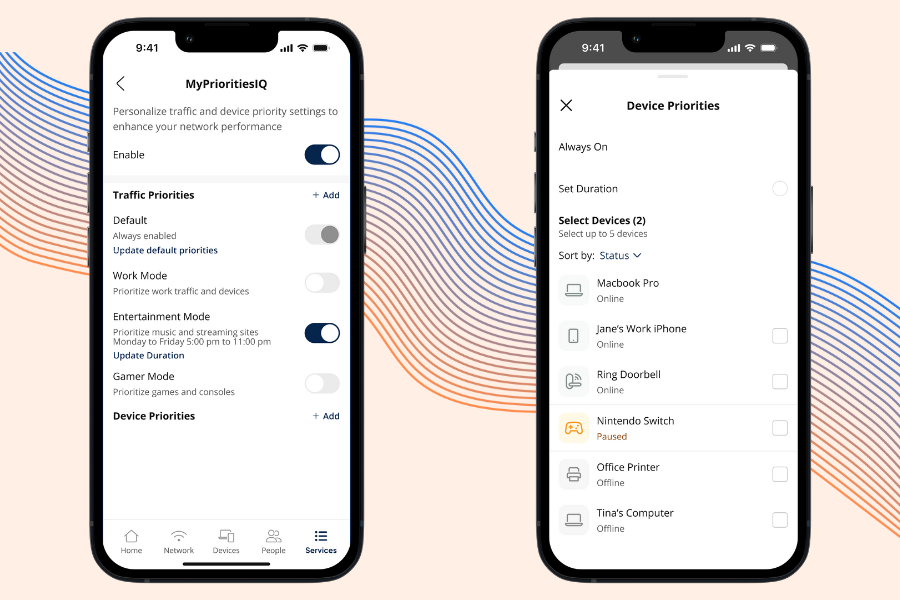
Prioritize activities, not just hardware
Instead of worrying about technical settings, you can focus on what you’re doing:
Video calls
Gaming
Streaming
Work tasks
The app handles the rest behind the scenes.
Make changes anytime, in real time
Priorities aren’t permanent. You can:
Turn prioritization on or off
Switch priorities throughout the day
Adjust based on what matters right now
Your internet adapts to your life, and not the other way around.
Final Thoughts on Quality of Service
Fast fiber internet is a great start, but how your bandwidth is shared makes all the difference.
Quality of Service (QoS) puts you in control by making sure your most important activities get the internet performance they need, exactly when they need it. Whether you’re working from home, gaming online, streaming movies, or juggling multiple devices at once, QoS helps keep everything running smoothly.
You don’t need to change your internet plan or understand complicated network settings. With the Race app, prioritizing your internet traffic is simple, flexible, and built for real households, not IT professionals.
Instead of wondering why your connection slows down, you can decide what matters most and let your Wi-Fi work smarter for you. That’s the power of Quality of Service: making your fiber internet work better for your everyday life.
FAQs
QoS is a feature on your router that manages internet traffic by prioritizing certain devices or activities, ensuring the most important tasks get the bandwidth they need.
No, QoS doesn’t increase your internet speed. It improves how your existing bandwidth is distributed, making your connection feel smoother and more responsive.
QoS is most useful when multiple devices are active at the same time, such as during video calls, online gaming, streaming, or large downloads.
Common priorities include:
– Video calls (Zoom, Teams)
– Online gaming
– Streaming (especially HD or 4K)
– Work-related uploads or cloud tasks
Yes. By prioritizing streaming traffic, QoS helps maintain consistent bandwidth, reducing buffering and improving video quality.
Even with fast fiber, multiple devices can cause congestion. QoS ensures your bandwidth is used efficiently, especially during peak usage times.
Yes. With app-based controls, you can adjust priorities in real time based on what you’re doing, whether it’s working, gaming, or streaming.