
- This list covers tools you choose yourself — not the Slack, Teams, or Zoom your company already assigned you.
- Security matters more than ever at home. Bitwarden (passwords) and NordVPN (privacy) are non-negotiables for any remote worker.
- AI tools like Claude are now core productivity tools — not novelties. Most remote workers using them save hours per week on writing and research.
- Async video (Loom) can replace a significant chunk of your meeting load. Send a video instead of scheduling a call.
- All of these tools depend on a reliable connection. Fiber internet with symmetrical speeds is the foundation of a productive home office setup.
Remember remote work during COVID? Most of us were still figuring out Zoom backgrounds and fighting over the kitchen table. Four years later, the home office has grown up, and so have the tools built for it.
One thing hasn’t changed: your company already picks the big stuff. Slack, Teams, Google Workspace, Asana, Zoom: those get handed to you on day one.

This list isn’t about those. It’s about the work from home tools you choose for yourself: the apps that make your personal setup faster, quieter, more focused, and more secure. Whether you’re fully remote, hybrid, or just work from home a few days a week, these are the work from home tools worth knowing in 2026.
Updated March 2026 · No sponsored content. No affiliate links.
1. Notion is your second brain for work
Best for: Notes, project planning, knowledge management
Notion has gone from cult favorite to genuinely indispensable for remote workers. It’s a workspace that replaces the pile of scattered notes, browser bookmarks, and half-finished docs most people accumulate.
Think of it as a personal wiki, project tracker, and note-taking app combined, all synced across your devices.
What makes it stand out in 2026 is Notion AI, which is now baked into the core product. You can ask it to summarize a long document, generate a draft, or pull answers from your own notes. It’s the kind of AI integration that actually saves time rather than creating more work.
- Organize projects, notes, and tasks in one place
- Collaborate with others in real time (great for async remote teams)
- AI writing and summarization built in
- Free personal plan available; paid plans from $10/mo
2. Claude is AI that collaborates with you
Best for: Writing, research, summarizing, thinking through complex problems
AI assistants have fundamentally changed how knowledge workers operate, and when it comes to creative projects and coding, Claude is one of the best.
For remote workers, the use cases are practical and daily: drafting emails and proposals, summarizing long documents, researching unfamiliar topics, debugging code, and thinking through decisions out loud.
Claude handles nuance better than most tools and has a longer memory within a conversation, which makes it genuinely useful for complex work rather than just quick lookups.
- Draft, edit, and summarize written content fast
- Research assistant for any topic without needing to open 15 tabs
- Handles complex, multi-step reasoning and analysis
- Free tier available at claude.ai; Pro plan at $20/mo
3. Loom replaces half your meetings with async video
Best for: Screen recording, async communication, walkthroughs
One of the most underrated shifts in remote work is the move toward asynchronous communication and Loom is the tool that makes it actually work.
Instead of scheduling a meeting to explain something complicated, you record a quick video of your screen with your voice and face overlaid, and send the link. The other person watches it when they can, on their schedule.
Loom is especially useful for feedback, onboarding, tutorials, and anything that’s easier to show than explain in writing. In 2026, Loom also added AI-generated summaries and transcripts, so recipients can skim before deciding whether to watch the whole thing.
- Record screen, webcam, or both in seconds
- Share via link — no file transfers, no email attachments
- AI-generated transcripts and summaries
- Free for up to 25 videos; paid plans from $15/mo
4. Todoist for task management that doesn’t get in your way
Best for: Personal task management, to-do lists, daily planning
Your company’s project management tool tracks team-level work. Todoist handles the personal layer: your own to-do list, daily priorities, and the tasks that fall outside of team projects. It’s fast, cross-platform, and genuinely pleasant to use, which matters more than it sounds when you’re reaching for a task app fifty times a day.
The natural language input is one of its best features. Type “submit expense report every Friday at 3pm” and it sets the recurring task automatically. No forms to fill out.
- Quick capture on desktop, mobile, and browser
- Natural language input for tasks and due dates
- Integrates with Google Calendar, Slack, and most major tools
- Free tier available; Pro plan $5/mo
5. Calendly for organizing your meetings
Best for: Scheduling meetings with external contacts, clients, or interviewees
If your company uses Outlook or Google Calendar for internal scheduling, that’s already handled. Calendly fills a different gap: scheduling with people outside your organization: clients, candidates, vendors, or anyone who doesn’t have access to your company calendar.
You set your availability, share a link, and they pick a time. No more back-and-forth emails. It syncs with your existing calendar, automatically adjusts for time zones, and sends reminders. In 2026, Calendly’s AI features can also suggest optimal meeting times based on your work patterns.
- Eliminate scheduling back-and-forth with external contacts
- Auto-detects time zones, critical for remote and distributed teams
- Syncs with Google Calendar and Outlook
- Free plan available; paid plans from $10/mo
6. Bitwarden for password management you can trust
Best for: Secure password management, team credential sharing
Password management is non-negotiable for remote workers. You’re logging into work systems from home networks, personal devices, and sometimes public Wi-Fi. Using weak or reused passwords is one of the most common ways remote workers get compromised.
Bitwarden generates strong unique passwords, stores them encrypted, and auto-fills across all your devices and browsers. There’s also a free tier that’s genuinely useful, not crippled.
- Open-source and independently audited, not just a security promise
- Free plan covers unlimited passwords across all devices (rare)
- Secure vault sharing for teams
- Free; Premium at $1/mo; Teams from $4/mo per user
7. NordVPN to keep your work traffic private
Best for: Secure browsing on home or public networks, privacy protection
Many companies provide a corporate VPN for accessing internal systems. But a personal VPN like NordVPN serves a different purpose: keeping your own browsing and traffic private, especially when you’re working from coffee shops, hotels, or any network you don’t control.
Even at home, a VPN adds a layer of privacy between your work activity and your ISP. NordVPN is one of the most consistently well-reviewed options for speed and reliability; important because a slow VPN will make you stop using it. It also includes a built-in threat protection feature that blocks ads and malware at the network level.
- Encrypts your internet traffic on any network
- Built-in threat protection blocks malicious sites and trackers
- Works across all your devices simultaneously
- Plans from ~$4/mo on a 2-year subscription
8. Freedom to block the internet from distracting you
Best for: Focus sessions, blocking distracting sites and apps
Working from home means the temptations are always one tab away. Freedom is a website and app blocker that helps you carve out distraction-free time when you need to actually get something done. You can block social media, news sites, YouTube, or anything else you keep drifting to across all your devices at once, so switching from laptop to phone doesn’t undo it.
The Locked Mode is the most powerful feature: once a session starts, you can’t override it. For people who find themselves “just quickly checking” things every fifteen minutes, that’s a game-changer.
- Block sites and apps across all devices simultaneously
- Schedule recurring focus sessions (e.g., 9am–12pm, Mon–Fri)
- Locked Mode prevents you from overriding your own blocks
- Plans from $3.33/mo on an annual subscription
9. Race CommandIQ helps you control your Wi-Fi like a pro
Best for: Race Communications subscribers who work from home
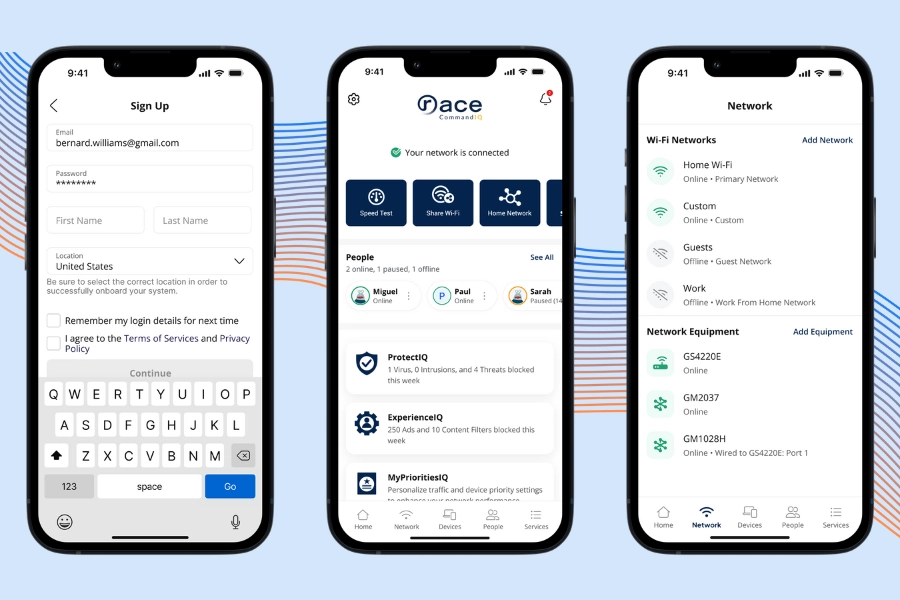
This one is a Race exclusive, but it’s genuinely one of the most useful work-from-home tools for Race subscribers. Race CommandIQ is Race’s free network management app, and it does something no third-party app can do: let you control internet traffic priorities on your own fiber network.
The feature that matters most for remote workers is traffic prioritization. You can tell CommandIQ to give your work laptop and video call traffic priority over everything else on the network; the kids’ streaming, gaming consoles, smart home devices. During working hours, your Zoom call gets the bandwidth it needs. After work, you can flip it back.
- Prioritize work devices and video call traffic during business hours
- Create a dedicated work-from-home Wi-Fi network (separate from personal/guest)
- See every device connected to your network in real time
- ProtectIQ blocks malware and phishing attempts at the network level
If you’re a Race subscriber and haven’t set this up yet, it’s worth ten minutes. Download it on the App Store or Google Play.
Your Work from Home Tools Are Only as Good as Your Wi-Fi
Every work from home tool on this list depends on your internet. Video calls, cloud sync, AI assistants, VPNs, and async video all require consistent, low-latency bandwidth to work properly. A slow or unreliable connection doesn’t just make things frustrating. It makes some of these tools unusable at the moments you need them most.
If you work from home regularly, a fast fiber connection is the best foundation. Race Communications offers fiber internet with symmetrical speeds up to 10 Gbps, no contract, and free professional installation, built for California households that need a connection that keeps up with real work.
Check availability today to get started.
Frequently Asked Questions
The tools that matter most depend on your role, but for most remote workers the essentials are: a solid note and project management app (Notion), an AI assistant for writing and research (Claude), async video for communication (Loom), password management (Bitwarden), and a VPN for privacy (NordVPN). Your company likely already provides collaboration tools like Slack or Teams.
A personal VPN like NordVPN is a good idea even at home, and especially if you ever work from a coffee shop, hotel, or any network you don’t control. It encrypts your traffic and keeps your browsing private. Note that a personal VPN is separate from a corporate VPN your employer may provide for accessing internal systems.
For a single person working from home, 100 Mbps is usually enough for basic tasks. But if you do video calls, upload large files, or work in a household with multiple people online at the same time, 300 Mbps or higher makes a noticeable difference. Symmetrical speeds (equal upload and download, available on fiber) matter especially for video calls and file sharing.
Race CommandIQ is a free network management app for Race Communications fiber subscribers. It lets you prioritize traffic to your work devices, create a dedicated work Wi-Fi network, monitor connected devices, and protect your network from malware and phishing. It’s particularly useful if multiple people in your home are online during work hours.
by
Tags: